Focus
One step on screen. Ten minutes on the clock.
Start a bigger task and the Focus page shows the step you're on, written large, with a clock running down beside it. One thing to look at, one thing to do.
Join the waitlist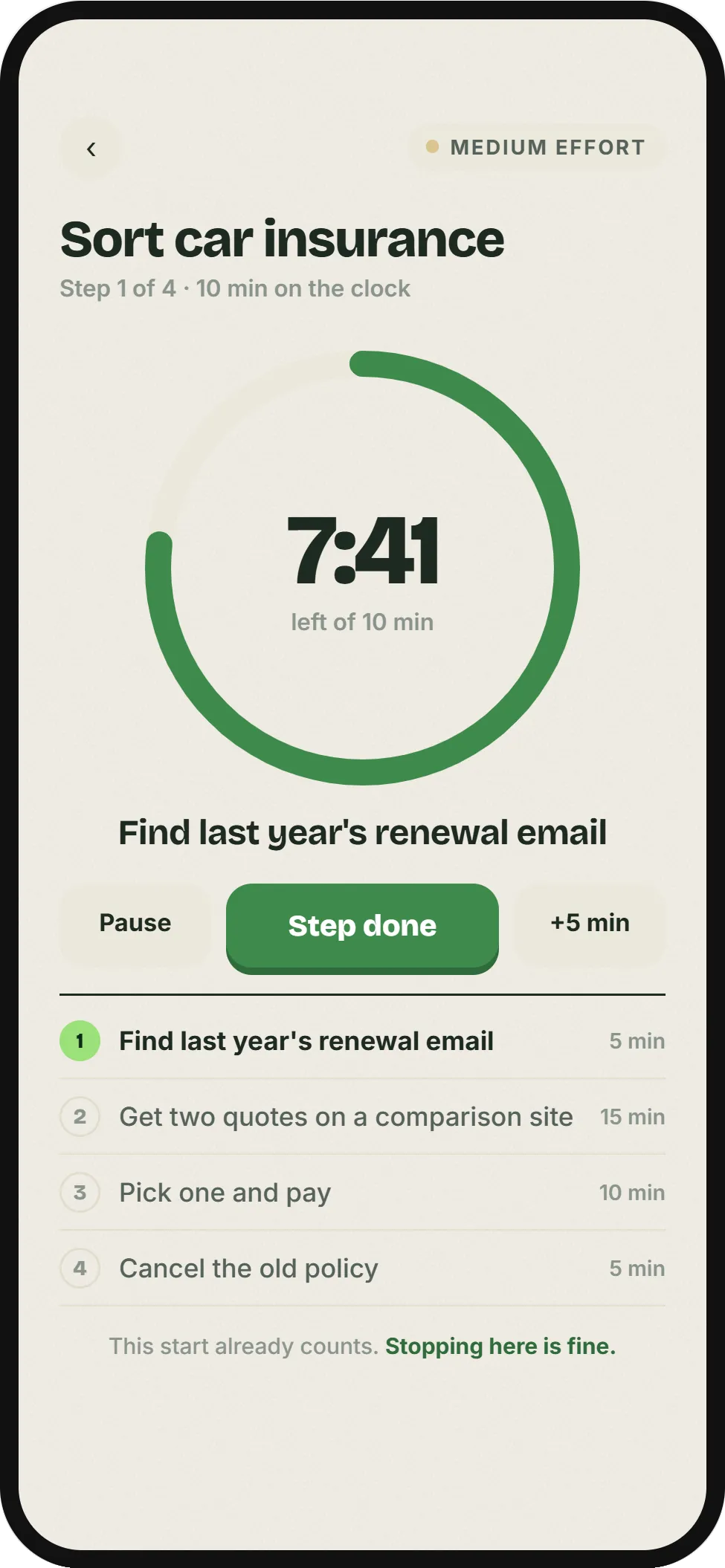
How it works
Start
A ten-minute clock begins, and the step you are on fills the screen. Nothing else is there to look at.
Step done
Tap Step done to move to the next one. Need longer? Add five minutes.
Stuck on a step?
Tap Stuck on this step? and Mosspatch splits it into something smaller, or swaps it for a different way in.
Stop whenever you like
Mosspatch keeps your place for next time. The start already counted.
Small jobs skip all this
Low-effort tasks open right there on Today: Start for a five-minute clock, Done already, or Later. The Focus page is for the medium and high ones, the jobs that need breaking into steps.
No steps yet?
A task without steps opens on ten minutes on the whole thing. Add steps, or ask Mosspatch to break it down, whenever you like.
Built for the bad days
This start already counts. Stopping here is fine.
That line sits at the bottom of every Focus page, because it's true. Ten minutes on the hard thing is a win, even if you stop there.
Works together with
- Help, I'm stuck
Frozen on a task? Name what's in the way and get one small first step.
- Your patch
A moss patch that grows every time you start, and never dies back.
Start the thing you've been putting off.
The iPhone app is on its way. Join the waitlist and we'll give you early access through Apple's TestFlight.
Join the waitlist